Zuma Physics
The Zuma games have a simple yet addictive gameplay loop: colored pearls roll along a path and the player must shoot them with same-colored pearls before they reach the end. It appears that everyone has fond memories of one of the Zuma games with their iconic frog character.
Despite the popularity of the genre, there's very little information on the internet how to implement a game like this. Even worse is speculation about code that sends you down the wrong path.
In this blog post, I'd like to present a way of implementing the Zuma mechanics that results in very responsive and juicy gameplay. Also, I'm including a working demo that you can play in your browser!
Overview
The core idea is to model the pearl mechanics as a one-dimensional physics simulation. Although pearls are moving on a two-dimensional spline, they are either moving forward or backwards on the path, so the movement is essentially one-dimensional. Simulating physics means taking velocity and acceleration into account which results in very juicy and dynamic gameplay.
It's tempting to model each pearl as its own physical object, but typically pearls don't move individually. During gameplay, gaps appear in the string of pearls and these gaps separate the pearls into segments that move together. An entire segment may slide back, for example, if its first pearl has the same color as the last pearl of the preceding segment.
Therefore, we model the string of pearls with shapes and bodies. A shape is a pearl, and a body is a segment of connected shapes. The terminology is borrowed from other physics packages, say Box2D, where a shape is used for collision detection, but it's the body that has the actual physical properties.
In code, the data of the simulation looks like this:
struct Shape
{
  Vector2   cachedPos;
  Vector2   offset;
  float     distance;
  uint16_t  bodyIndex;
  uint8_t   colorIndex;
  uint8_t   flags;
};

struct Body
{
  float     vel;
  float     acc;
  uint16_t  firstShapeIndex;
  uint16_t  shapeCount;
  uint8_t   flags;
};
The shapes and bodies are stored in two large, fixed-sized arrays. Generally speaking, there's always a practical upper limit on how large a game level can be, so we don't need to deal with dynamic memory allocation.
Shape      shapes[MAX_SHAPES];
uint16_t   shapeCount;

Body       bodies[MAX_BODIES];
uint16_t   bodyCount;
An important invariant is that the shape and body arrays are ordered by their position on the spline. Put differently, neighbouring shapes on the spline are next to each other in the shape array.
Every shape stores an index to the body it belongs to, and every body stores a list of shapes via firstShapeIndex and shapeCount
(here, we make use of the ordering invariant).
Also, using indicies instead of pointers keeps the data structure small which benefits cache efficiency.
The vel and acc fields store the body velocity and acceleration, respectively.
The shape structure has multiple fields relating to its position.
The distance is used to sample the spline and get a position vector, which we cache in cachedPos.
The offset is a visual-only offset from the actual position on the spline, which we discuss later when we see how shapes
can get added during gameplay.
Body Simulation
The bodies follow a simple particle simulation. That is, we set accelerations and resolve collisions.Moving bodies and shapes
First, the string of pearls needs to move forward. We only want to push the first segment, so that disconnected segments down the path stay at rest. One way of doing this is to apply acceleration to the first body when it touches the beginning of the path. Since the shapes are sorted by distance, we can simply check if the first shape of the first body is not too far from the beginning of the path.
// First body connected to the spawn moves on its own.
{
  Body* firstBody = world->bodies;
  firstBody->acc = 0.0f;
  if(world->shapes[firstBody->firstShapeIndex].distance <= (2.0f * PEARL_RADIUS))
  {
    if(firstBody->vel <= kPearlSpeed)
    {
      firstBody->acc = 200;
    }
  }
}
Next, we apply a negative acceleration for bodies that are sliding backwards. A body slides backwards if the color of its first shape
matches the color of the previous body's last shape (segments with matching end color attract each other).
Similarly, a body that is sliding back receives a negative acceleration. Note that a body only slides back when it is attracted by the previous body's last shape color. If that color changes, the body stops sliding and needs to gracefully come to a rest. Therefore, we add some friction to the body simulation:
// Other bodies may slide back
for(uint16_t bodyIndex = 1; bodyIndex < world->bodyCount; ++bodyIndex)
{
  Body* body = world->bodies + bodyIndex;
  Body* pred = body - 1;

  // ...

  const uint8_t colorIndex = world->shapes[body->firstShapeIndex].colorIndex;
  const uint8_t predColorIndex = world->shapes[pred->firstShapeIndex + pred->shapeCount - 1].colorIndex;

  if(colorIndex == predColorIndex)
  {
    body->acc = -50.0f;
  }
  else
  {
    // Apply friction
    body->acc = -10.0f * body->vel;
  }
}
Finally, we update the velocity of a body and the position (distance on the spline) of a shape by doing a simple integration over a fixed timestep PHYS_DT.
// Move shapes
for(uint16_t bodyIndex = 0; bodyIndex < world->bodyCount; ++bodyIndex)
{
  Body* body = world->bodies + bodyIndex;

  body->vel += body->acc * PHYS_DT;

  Shape* bodyShapes = world->shapes + body->firstShapeIndex;
  for(uint16_t shapeIndex = 0; shapeIndex < body->shapeCount; ++shapeIndex)
  {
    bodyShapes[shapeIndex].distance += body->vel * PHYS_DT;
  }
}
Resolving body collisions
Detecting if two bodies overlap is simple: Since their shapes are ordered by distance we only need to check the end shapes for overlap. Then, we need to resolve the penetration by moving the bodies apart. In addition, an important step for the simulation is to merge the two colliding bodies, as the two colliding segments are now connected and should be simulated together!
That's all there is to it for the body simulation. Again, a body represents a connected segment of shapes (pearls) that slide forward and backward along the path. Next, we'll take a look at how the string of pearls grows when the player shoots at it.
Dynamic shapes
When the player shoots a pearl at the string of pearls and the projectile hits, there are two possible interactions: If the projectile pearl has the same color as the pearl it hits, then the hit pearl and all its neighbours with the same color are destroyed. This may leave a gap in the string of pearls. (We ignore the usual Match-3 aspect of the Zuma games for now as it's not substantial for the explanation). Otherwise, if the projectile has a different color than the hit pearl, we need to insert a pearl and grow the string of pearls. We dig into the latter case first and see how a new pearl can be added.
Adding a shape
In our implementation, a pearl is added by adding a new shape to an existing body. It's important for the pearl projectile to be smoothly sliding into its slot. Or at least it should appear to the viewer that it does. In reality, there's some smoke-and-mirrors involved behind the scene. First of all, the projectile and the pearl on the string are two completely different objects in code. As soon as the projectile hits, we delete it.
What actually happens is that a new shape is added at the exact same location as the hit shape! Then we make sure to resolve the overlapping shapes over time by pushing them apart. As a consequence, the body that the shapes belong to grows. Remember that bodies resolve their collisions, too, and will push each other apart as well.
The final part of the trick is to fix the disconnect between the projectile which moves freely in space and the shape which is always constrained to the path.
How can we smoothly move a shape into place when we immediately put it right on top of another shape? The important idea here is to separate the pearl visuals from the collisions.
For simulation purposes, the shape spawns on the path immediately and starts pushing its neighbours away. The rendering code, however, can draw the pearl with an offset from its
physical collision to match the projectile collision, and then smoothly reduce this offset over time. This is exactly what the offset field in the Shape struct is for.
Removing a shape
When the pearl projectile hits a pearl of the same color, we have to remove shapes from a body. The logic is quite simple, but there's a lot of tedious book-keeping involved, so I spare you the details. What I will say is that after removing shapes from a body, we may end up with no body (no shapes are left), a single body (a shorter segment is left), or two bodies (the hit body got separated in the middle). The rest is diligently updating thebodyIndex, firstShapeIndex, and shapeCount values.
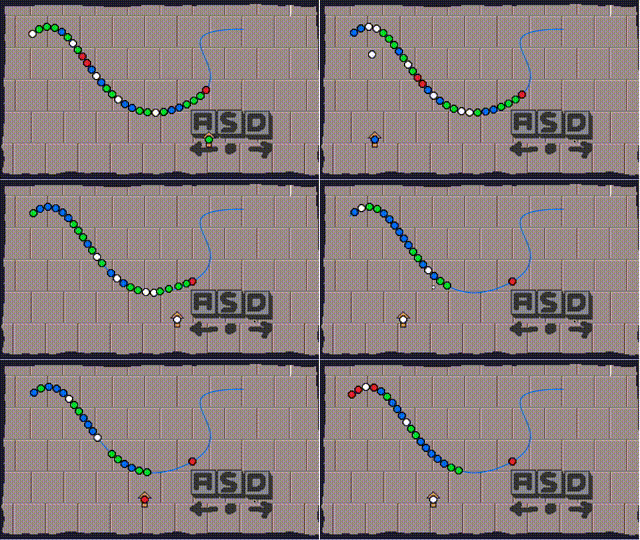
The playable demo
I put together a small demo game with Raylib that you can play directly in the browser!
Move the player by pressing A and D, and shoot pearls with W or S.
Bonus: The HypeHype game
I also made a Zuma-like game in HypeHype to show off the spline editor! The game is called Pearl Kingdom and you can play it in your browser if it supports WebGPU (Chrome, for example, works). The mechanics are different than described in this blog post, as it's implemented in terms of actual Jolt physics objects, but it does look gorgeous. Play it here